
# Copy Instance
- Hold down ctrl and drag to copy parts
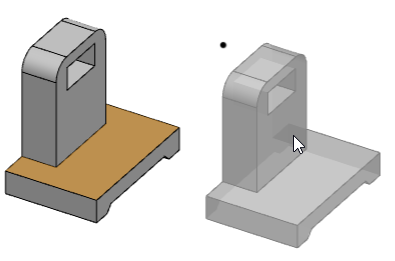
- Hold down Ctrl, and drag the parts in the viewport with the mouse. The parts are not moved, and a translucent preview of the copy instance appears at the mouse pointer;
- Release the left button to generate the copied instance at the mouse pointer.
- After Ctrl+c click the left button in the viewport to generate the instance.
- Select any part and press Ctrl+C. When the mouse moves to the viewport, a translucent preview will appear at the pointer.
- Release the left button to create a copy instance at the mouse pointer.
- Continuous Copy-Paste: After pressing Ctrl+C, continuously press Ctrl+V to generate multiple component instances.
After pressing Ctrl+C, move the mouse cursor into the viewport and press Ctrl+V or click the left mouse button to generate a single copied instance.
Continuing to press Ctrl+V generates copied instances at the cursor position; each press creates one instance.
If Ctrl+V is pressed while the mouse is outside the viewport, the generated instance will overlap with the source component.
Press Esc to end the copy-paste operation.
When copying a part in a subassembly, copy the part under the current assembly.