
# Export Assembly
Export assembly, Support the IGES file format (. IGES), STEP (. STEP), NX (. PRT), CATIA (. Catpart), SolidWorks (. Sldasm), ParaSolid(.x_t/.x_b),STL . (STL), OBJ (. OBJ), the IFC (. IFC), FBX.
- Click
 the icon to bring up the menu, select the options
  in the menu, the pop-up dialog box is as follows:
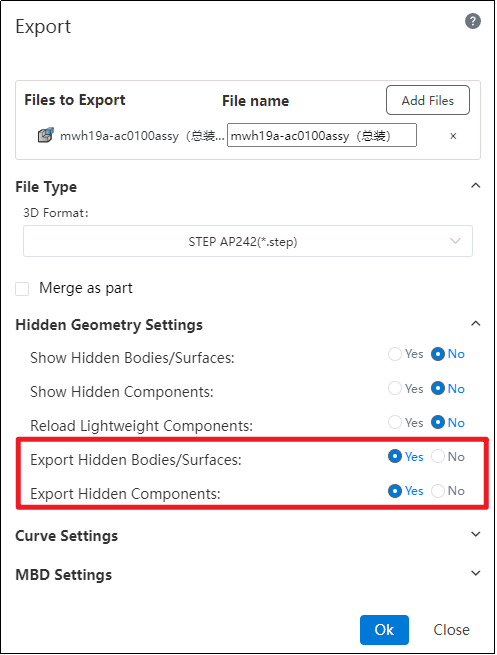
Merge as parts: Check to merge assembly as one part export. When this is checked, you can select the geometry you want to save.
- All Parts: Export all parts.
- External faces: Export only the external faces of the parts, ignoring the internal elements.
Hide Geometry Settings:
In the "Restore Hidden Bodies/Surfaces to Display State" and "Restore Hidden Parts to Display State" options under hidden geometry settings, selecting "Yes" will display the relevant geometry and parts, which will then be exported.
When "Restore Hidden Bodies/Surfaces to Display State" and "Restore Hidden Parts to Display State" are selected as "No," if you check "Yes" for the "Export Hidden Bodies/Surfaces" and "Export Hidden Parts" options, the hidden geometry and parts will be exported.