
# Line Type Scaling
Supports setting the scaling ratio for line types such as dashed lines, affecting the density of the lines.
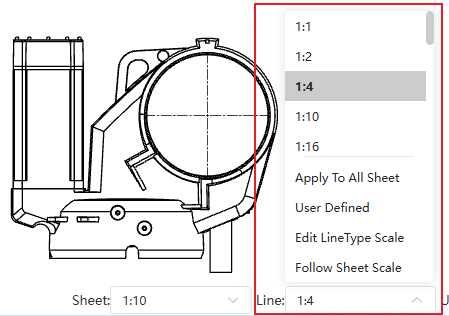
Usage:
Open the Drawing.
Click the line type dropdown in the bottom right corner.
Select the desired line type scaling ratio from the dropdown list.
Dialog Box Control Descriptions:
Apply to All Sheet: Applies the ratio to all sheets within the current Drawing.
User Defined: Allows customizing ratios not listed.
Edit LineType Scale: Allows editing ratios in the list.
Follow Sheet Scale: The line type scaling ratio is linked to the sheet scale. This option reflects the line type effect in CC 2026 R2 and earlier versions.