
# Lofted Bend
Added the Lofted Bend command, which can be used to create sheet metal components such as the round-to-square ventilation openings.
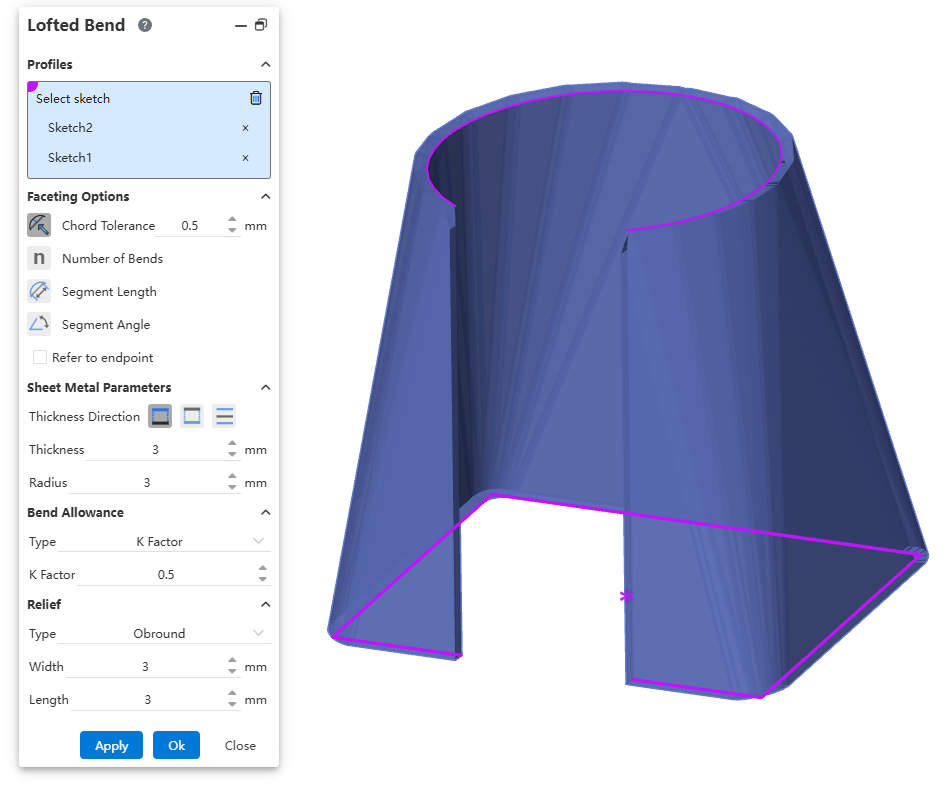
How to use:
Open the Developed Bend command.
Pick two sketches as the profiles for the develop.
Set the parameters and options.
Click OK to complete the feature creation.
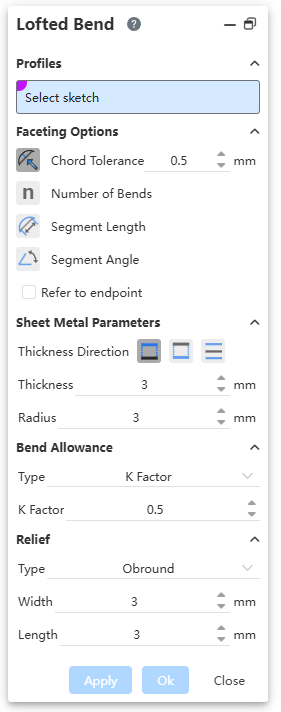
Dialog Box Controls Explanation:
Select Sketches: Pick two sketch profiles.
Developed Bend Options: Controls the effect of the developed bend, influencing the number of bends.
Reference End: Controls the effect at the corners of the profile edges.
Thickness Direction: Chooses the "thicken" direction relative to the sketch profiles.
Thickness: Sets the thickness of the sheet metal.
Radius: Sets the radius of the bend in the sheet metal.
Developed Bend Parameters, Release Slot: Similar to Base Flange.
Explanations:
Sketches must be single, continuous, non-crossing open loop contour.
Sketches must be located on parallel reference planes or flat surfaces.
The opening direction of the sketches must be clear and consistent.
Linear edges of the two sketches should be parallel, and the number of line segments should be as equal as possible.
Avoid sharp transitions; add fillet arcs at complex changes.
← Break-Corner Cut Vent →