
# Sketch
# Styled Spline
A new Styled Spline command has been added, allowing the creation of Bézier curves or B-spline curves of various degrees.
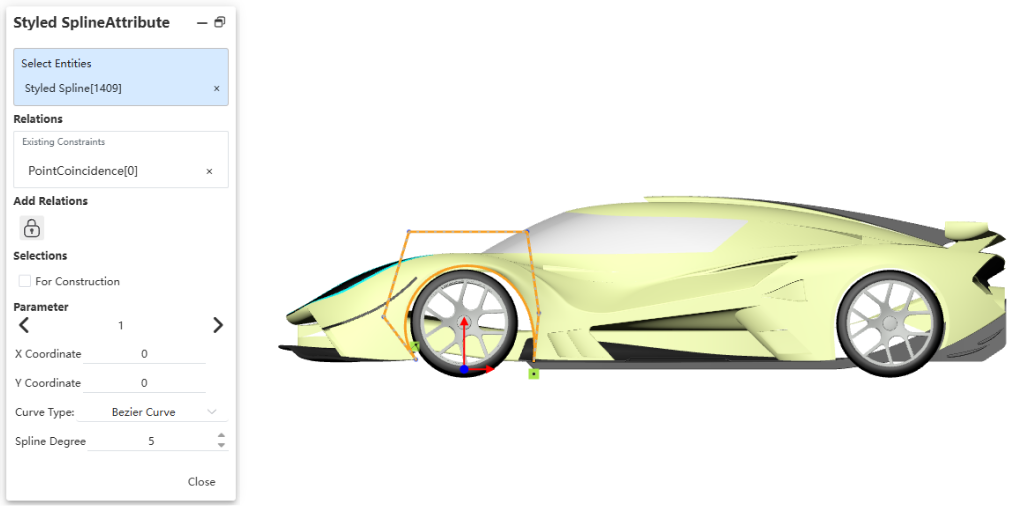
Usage:
- Click the "Styled Spline" command.
- In the pop-up dialog, select the type of styled spline to create.
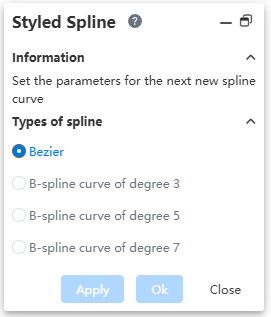
- Click in the viewport to specify the first point of the styled spline.
- Continue clicking to specify other control vertices on the curve.
- End the curve creation using one of the following methods:
a. Click the "Apply" or "OK" button of the Styled Spline.
b. Double-click the left mouse button.
c. Right-click the mouse.
Note 1: The styled spline has a minimum requirement for the number of control vertices, which varies by type. The minimum number of points required to create a B-spline of degree 3, 5, and 7 is 4, 6, and 8, respectively. The minimum number of points required to create a Bézier curve is 3.
Note 2: When the specified number of points does not meet the minimum requirement for the selected type, it will automatically switch to create another type of curve that satisfies the requirement.
Dialog Control Description:
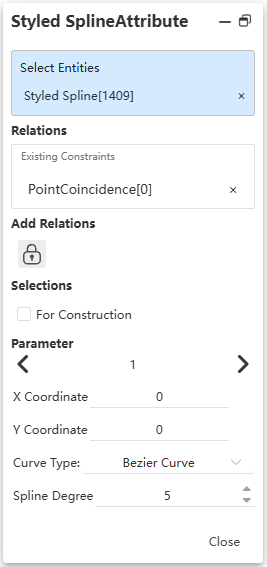
· Add Relations: Displays the constraints that can be added. Click to add the constraint to the selected element.
· For Construction: Controls whether the current element is a reference line.
· Index: Displays which point on the curve the current parameter corresponds to. Click the left/right arrows to switch points.
· X, Y Coordinates: Displays the coordinates of the current point.
· Curve Type: Allows switching the current curve type. Supports "Bézier curve, B-spline: Degree 3/5/7".
· Spline Degree: This control is displayed only for Bézier curves and can be used to change the curve degree.
· Control Vector: This control is displayed only for B-spline curves and shows the number of control vertices of the current curve.