
# View Mate
In the assembly document, select one or more elements to display a list of fits and edit fits. It is easy to visually see which fits exist in the element.
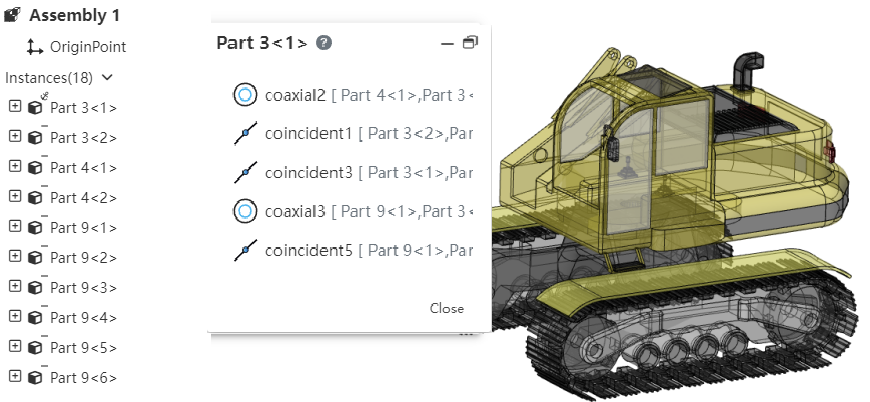
How to use:
1) In the viewport or instance list, select one or more parts, benchmarks, origin and other elements that can participate in the fit.
2) Right-click the "View Mate" function.

3) Click it to display the list of the selected elements, and the display status of the parts in the viewport changes.
Parts display status:
When the parts are compatible: all the existing top-level instances in the document automatically open the transparent function (the transparent function in the instance right click); Parts that are not included are automatically hidden
Parts that have been hidden before opening the match list will automatically become displayed and transparent when included, and remain hidden when not included
When the parts are not compatible: all parts automatically open the transparent function, and there are no more hidden parts
Match list operation:Click a match in the list with the left mouse button, and the corresponding element is highlighted in the viewport; Right click to display [edit], [delete] function, and the effect of the right click in the cooperate list of the two functions is consistent.