
# Quick View Mode
Quick View Mode now includes an editable feature, allowing you to modify assembly structure or component relationships.
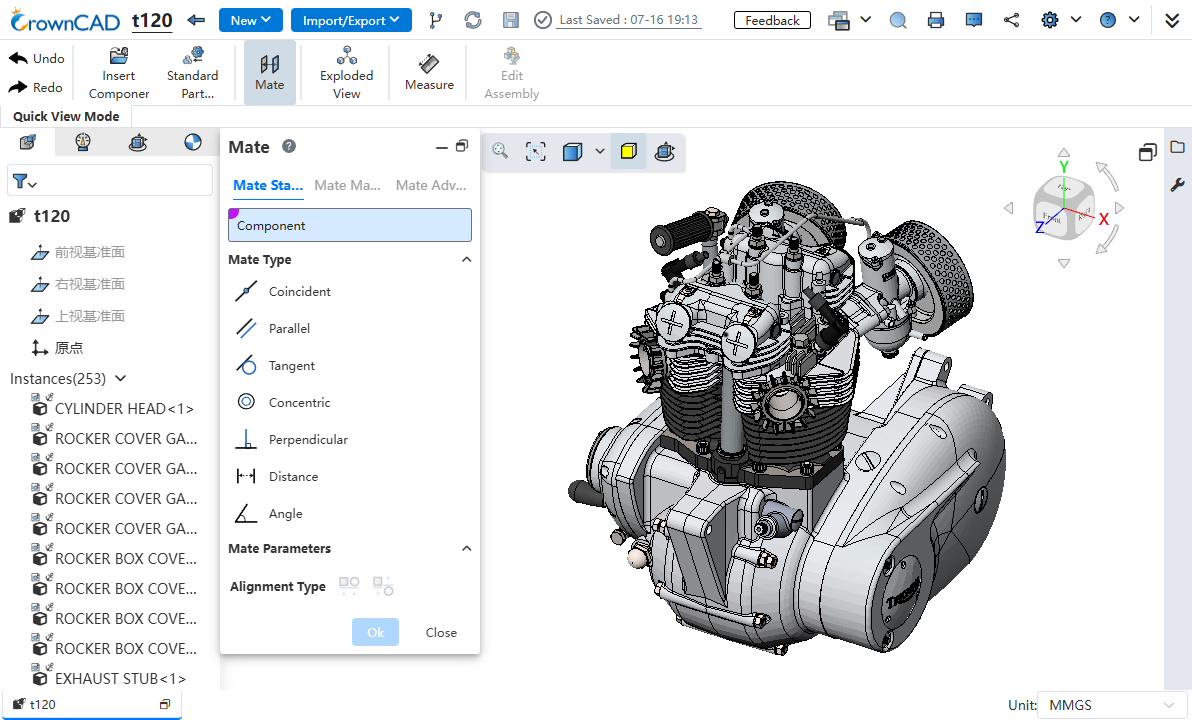
Usage:
- In the document list, right-click the document you want to open, and select Open > Quick View Mode.
- In the pop-up dialog, select "Assembly Edit Mode".
- Use the "Insert Part or Assembly, Standard Part Library, Mate, Exploded View, Measure" functions to operate the assembly model.
Description:
- Opening Methods for Quick View Mode:
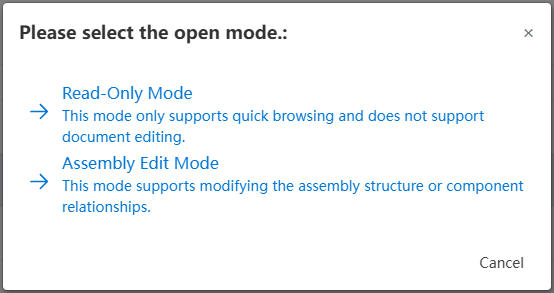
Read-Only Mode: Only supports browsing the model, not editing. In this mode,you can click the "Assembly Edit Mode" command to switch to "Assembly Edit Mode".
Assembly Edit Mode: Supports using the "Insert Part or Assembly, Standard Part Library, Mate, Exploded View, Measure" functions to operate the assembly model.
In Quick View Mode, components such as envelopes are not displayed as semi-transparent.
Flexible sub-assemblies will move as rigid sub-assemblies in Quick View Mode.
Collaboration:
- Only Quick View Mode to Quick View Mode collaboration is supported. Mixed collaboration between Quick View Mode and normal mode is not supported.
- Users in Quick View Mode cannot follow other users.
Note: Quick View Mode opens the model using a streaming load method. The model cannot be operated during the loading process. When the progress bar completely disappears, the model becomes operable.
Client Graphics Card Hardware Requirements:
Minimum Configuration: VRAM 4GB, supports loading up to 200 million triangles and assembly scenarios with 40,000 parts.
Recommended Configuration: VRAM 8GB, supports loading up to 400 million triangles and assembly scenarios with 80,000 parts.
Browser Requirements:
Google Chrome 139 and above;
Microsoft Edge 139 and above;
Mozilla Firefox 153 and above.
← Library Application →