
# Lofted Boss/Base
Make transitions between two or more Outlines to generate solid features.
Click in the toolbar to open the Lofting boss/Matrix command dialog box, whose interface is shown below.
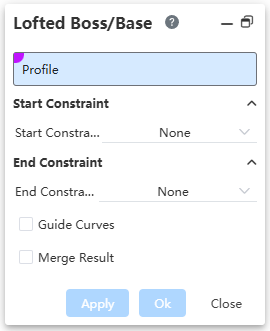
- Sketch outline: Closed sketch outline, you can choose multiple.
Note:
It can only be a sketch outline that contains a closed area.
- Starting constraints: None、Vertical To Sektch、Direction Vector、Tangency to face.
- End constraint: None、Vertical To Sektch、Direction Vector、Tangency to face.
Note:
In the lofting preview effect, each outline will have a control point, adjust the control point to adjust the lofting effect.
Note:
Tangency to Face Constraint: Only available when selecting edges of a face as the Profile.
- Guide line: Through the guide line control lofting external outline, you can choose sketch line, edge line or curve, support multiple selection.
- Merge results: Check this option when the scanning body is merged with its intersecting body.
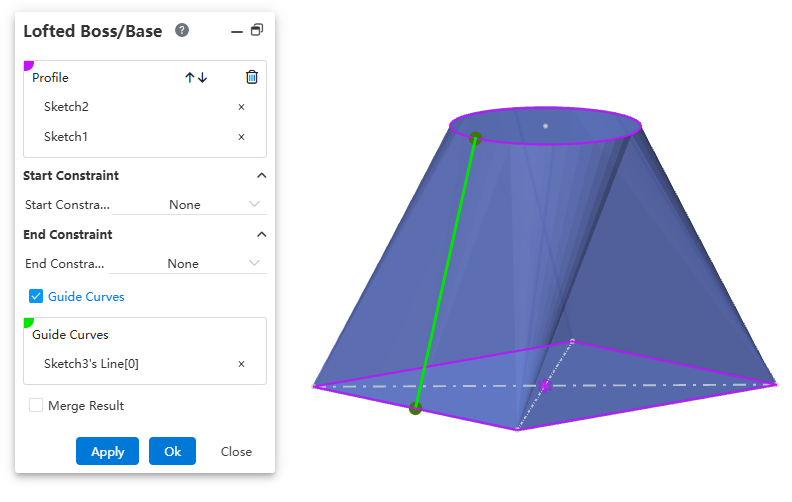
Example: Lofting outline for two circular sketches, unguided line and guided line preview effect as shown in the figure below.
← Swept Cut Lofted Cut →